
Examples are worth more than words, so here are not one, but two videos!
The first one is a quick overview on how to produce SID with AT3:
And the second one is a demo I presented at Revision 2026, which was the first one to use my SID player on CPC:
SID is a type of sound born on Atari ST, in order to simulate what the C64 “SID” chip could produce out-of-the-box. “SID”, as commonly called on AY/YM, should actually be referred to as “ST-SID” because, truth be told, it is a far cry from the C64 SID!
A typical SID sounds like this:
Availability
Caution! Before throwing yourself into this new effect, please be aware that SID, on 8-bit machines, have a high CPU cost and severe limitations depending on the hardware. It is also not available on all platforms (yet). Please read carefully the implementation details first!
- The Amstrad CPC player is available, but accepts one SID at a time (you can have SID on channel A, then use SID on channel B afterwards, etc., but not at the same time). It consumes about 50% of the CPU and needs cycle-accurate code. The tester in the package already handles all that, with a keyboard test, so it is possible for you to use SID for a title screen in a blink of an eye! But if you want to add more effects… Good luck!
- The Amstrad Plus player is a work-in-progress. It will be possible to play SID on three channels at once. As the Plus has DMAs, the player will be lightweight, CPU-wise.
- An Atari ST player is also in progress.
What is SID?
With all this out of the way, let’s describe what “SID” is about.
SID is an effect that adds a layer above the PSG sound that, very quickly, like a sample would, alternates a high-state (the PSG sound), and a low-state (typically, a “volume 0”, no sound). This kind of “chops” the sound into thin slices, removing one of two. Just like hardware sounds that modulate the square sound, the SID creates a new sound, and thanks to the slight desynchronization between the period of the square/hardware and the SID periods, adds even more expression.
This desynchronization heavily depends on the power of the hardware, and, often related, the accuracy of the player. Atari STs are lucky to have timers, and pretty accurate too. Most 8-bit don’t (one exception being the Amstrad Plus)! So they must rely on CPU-accurate code, which, besides being a nightmare to code for the player coder (i.e. me), is also a nightmare for those wanting to do anything else during the SID (i.e. probably you).
Set up your song
Before all things, make sure that your PSG is correctly set-up to your target hardware. Go to Edit > Subsong > Edit <name> properties.
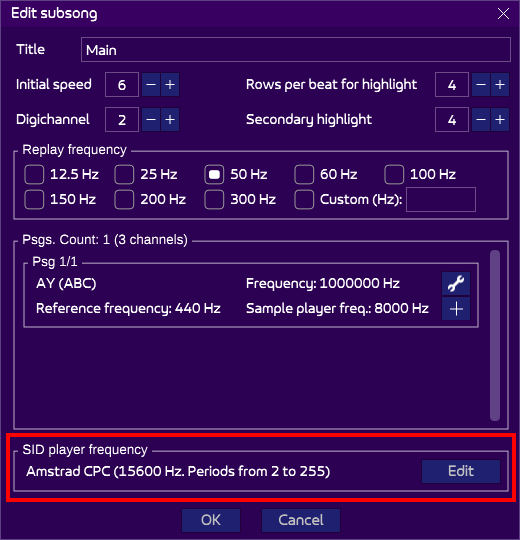
Make sure the target is correct. If not, click on Edit to change it. The values directly depend on the player, so unless you are using a custom player, stick to one of the default choices!
Creating a SID
The instrument editor has a new section dedicated to SID at the bottom:
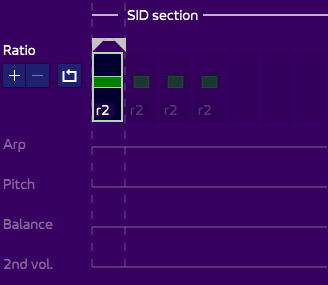
Ratio
This parameter is what triggers the SID on or off. By default, it is off, but you can set it from 0 to 4. The most typical value is 2.
This parameter indicates how much the SID period is slower than the period of the sound (by a power of 2).
It is important to note that the reference period the SID period is calculated from depends the type of sound:
- Software, soft-to-hard, soft-and-hard will have SID period calculated from the software period.
- Hardware and hard-to-soft will have the SID period calculated from the hardware period.
- What about the “no sound” type of sound? Well, it will use the software period too! But what? There is no software period, since the PSG doesn’t generate anything! Yes, but you still indicate a note in the patterns! This note relates to a period, so that the SID can be generated too. As we will see below, this will help produce some very cool sounds.
Arp
The “arpeggio” in the SID section is different from the Arpeggio you can find above in the primary or secondary section. While the classic arpeggio changed the note within a frame, “SID arp” changes the SID period according to the software (or hardware) one. This means that you actually hear two sounds on one channel!
As shown in the video above, you can still alternate the SID arp in each frame, but it is also perfectly fine to keep the same value, such as 7 or C, which is quite handy to produce a massive bass sound!
Pitch
The pitch adds a desync to the SID period. You can create a SID vibrato, or create more desync to a perfectly-synced sound for example.
Balance
As I mentioned earlier, SID alternates high and low shelves. In most players, these shelves have the same duration. AT3 pushes the boundaries a bit further, by allowing you to indicate whether the high state should be longer or shorter.
This is especially noticeable when using the “no soft no hard” sound type, as shown in the video!
2nd vol.
Most SID players consider the low-state to have a volume of 0. AT3 allows to use another value. This might not feel useful most of the time, but by playing with the balance, it can reveal fun and original sounds!
Exporting to the hardware
The only player capable of playing SID is currently the AKY. Export to AKY like you would normally do, and use the tester called “PlayerAkySidTester_CPC.asm” in the package, for a ready to use solution!